
Home Page
Understand the dashboard and the most important daily actions.
The Home page is the first thing you see when you enter the platform.
It acts as your working list for the day, bringing together everything that needs your attention in one place.
At the start of your day, you can come here and immediately see what needs to be done, without needing to check different areas of the platform.
Today and ongoing work
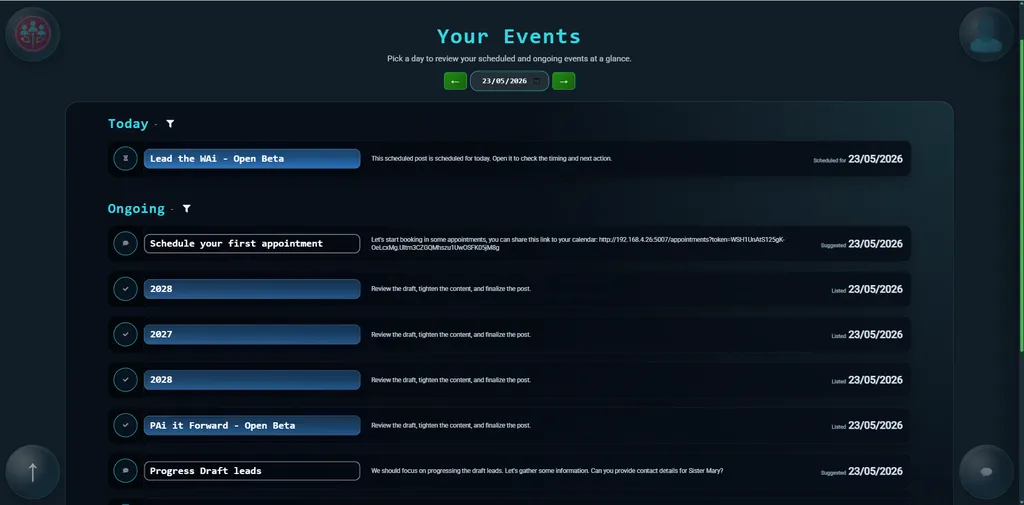
When you open the Home page, it defaults to today.
This means the first thing you see is what needs to happen right now, making it a natural place to start your day.
Your work is split into two parts: what needs to happen on the selected day, and what is still in progress.
The today section shows anything tied to that date. This might include scheduled posts, follow-ups, messages, or appointments.
Below this, ongoing items remain visible until they are completed or moved forward. These are things that still need attention, even if they don’t have a fixed date.
Start with what’s due today, then move through anything that’s still in progress.
Working through events
Each item on the page is shown as an event.
You can work through these directly from the Home page. As you complete something or move it forward, you can update it without leaving the page.
If something changes, you can also adjust dates here, for example if a task is delayed or needs to be rescheduled.
In most cases, you can treat the Home page as your working list and move through items one by one.
Event Types
You’ll notice that not all events look the same. Each one has an icon that shows what kind of action is needed.
-
/home-manual-event-1024.webp)
Manual events (tick icon) are things you need to do. Once you’ve completed the action, click the tick to mark it as done.
-

Automatic events (timer icon) are there to keep you informed. These happen in the background and don’t require any action from you. They simply let you know something is happening or about to happen.
-

Recommended events (speech bubble icon) are suggestions. When you click one, it opens a guided conversation where the platform asks you questions and helps you move the work forward.
This isn’t like a normal chat where you need to think of what to ask. Instead, you just respond to what’s shown and follow the flow.
If you’re ever unsure what to do next, recommended events are a good place to start.
Moving through dates
At the top of the page, you can change the date.
This lets you look back at past activity, focus on today, or plan ahead. The page updates automatically based on the date you select.
It’s useful if you want to prepare work in advance or review what’s already been done.
Filtering your view
If you have a lot of activity, you can filter what you see.
For example, you can focus on a specific area like Leads or Posts, or reduce the number of items shown at once.
This helps keep things manageable as your workload grows.
User and Company View
The Home page changes depending on whether you’re working as yourself or viewing the company workspace.
In user mode, you’ll see your own activity. In company mode, you’ll see activity across the team.
This makes it easy to switch between your own work and a wider view when needed.
Summary
The Home page is your starting point each time you use the platform.
It shows what needs your attention, lets you take action quickly, and helps you keep work moving without needing to check multiple areas.
Read next: Library Page
Continue to Library Page.